Annoying Razer Synapse Updates
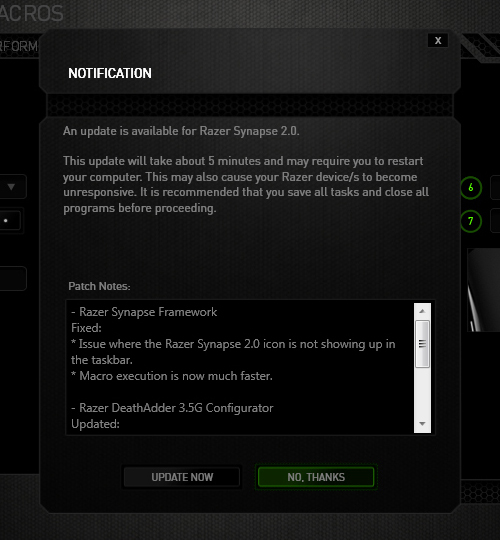
Ever since I installed Razer Synapse (Cloud-Based Mouse Driver) for my DeathAdder mouse I get very annoyed by the software updates. First of all, 99% of the time the update will require you to reboot your system which no ones likes. Especially when you just booted up your computer. Second, the windows where you confirm the update installation is pretty stupid as well.
The image below is the default state in which the notification was presented. The "Update Now"(OK) option comes before the "No Thanks"(Cancel) option. Now there's always the debate whether the button arrangement should be "OK-Cancel" or "Cancel-OK". Both button orders are legitimate as the Nielsen Norman Group article points out, but what confused me was the button highlight. While updating the driver would be considered a "dangerous" action. I was immediately drawn to pressing the highlighted button, because in most UI cases they will highlight the option that they want you to press. So combined with the "I-just-want-to-get-this-over-with" mentality, I pressed the highlighted "No Thanks" option thinking it was updating when the window minimized to the system tray. Little did I know the update notification popped up again the next day when I turned on the computer... confused and enraged why Razer Synapse asked me to update again, I then discovered I was pressing the wrong button when I saw the update window for the second time. Am I raging about nothing? Or maybe I should just learn to read next time :(

[How] Print Screen with Cursor
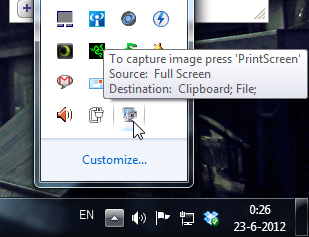
 Shocking discovery the other day... you CANNOT have your mouse cursor be visible when you make a print screen using the print screen button. Now, I've known that the cursor won't show up in print screens, which is awesome and useful usually, but there's actually no way to make the cursor visible in Windows 7 (not sure if it's possible in older versions.. I remember XP used to?). Looked all over the internet with no results. The best option is to install a 3rd party software such as Gadwin Print Screen.
Gadwin Print Screen is easy to use and it can other ride the current print screen button or other button if you like. You can toggle the cursor to be visible or not. Also, change the capture directory and the file type of your print screen. When downloading, make sure you download the freeware version, unless you're willing to pay for the pro version. So far, the freeware version works great! And the best thing is they aren't trying to force you to buy the pro version with watermarks or anything. Finally, print screens with cursors again!!! Great... right?
Illustrator: Free Transform Tool
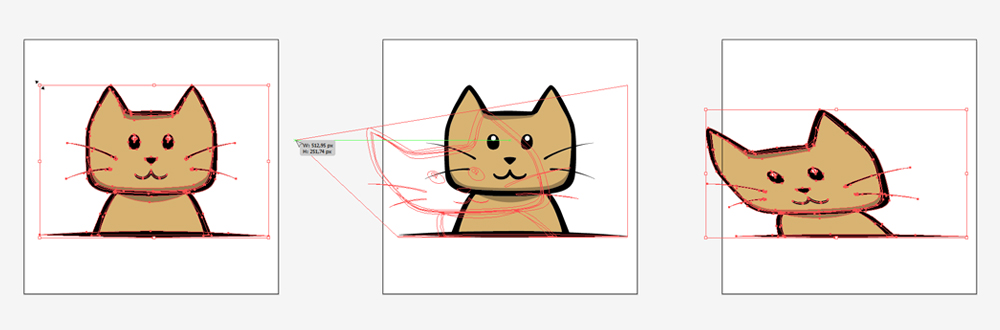
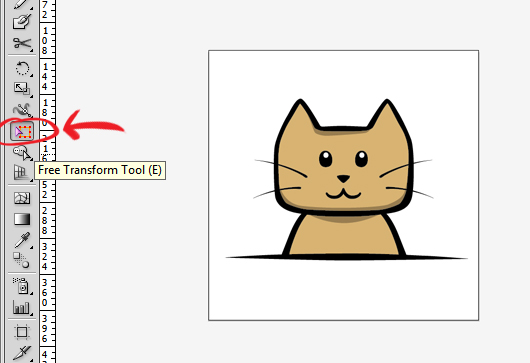 One thing that was always confusing in online tutorials was how to move an object in perspective using the Free Transform Tool. The Free Transform Tool (E) is located somewhere in the middle of the toolbar (see picture).
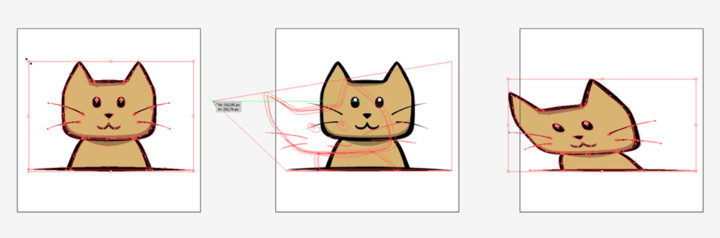
It's weird to control the free transform tool and it's not very intuitive. The way to do it is to CLICK and then press CTRL. The sequence is very important. The free perspective transform won't work if you switch it around; ctrl + click, it will result in a regular transform.
So remember the sequence "CLICK + CTRL" to transform in free perspective using the Free Transform Tool (E).
Future Film Force - Mario Paint Game Trailer
http://www.youtube.com/watch?v=-tBwDBUhKxo&hd=1
Mario Paint Game Trailer for Visual Story class 2011 - Entertainment Technology Center, Carnegie Mellon University
- Albert Gea
- Dicky Lou
- Elwin Lee
- Daniel Hausmann
- Eric Zhang
Design and develop a 1 minute long video, to sell an existing PC, console or handheld game. Make it as exciting and believable as possible.
Another team's pre production work (4.0. Game Trailer Pre Production) will be given, move the project forward by doing any kind of filming, editing and post production work.
Flash AS3 TextField buttonMode
 It got so frustrated when the mouse cursor didn't change into a hand-icon when I do a MOUSE_OVER event over the MovieClip containing that TextField with "buttonMode = true;"
Apparently, the TextField class in AS3 doesn't contain the buttonMode property. The cursor does change into a hand whenever I scroll over the MovieClip, but turns back to the default cursor if I'm moving over the TextField :@
Luckily Google saved me some headaches!
To get round this simply use the "mouseChildren = false" property on your Sprite/Movieclip button.
mc.buttonMode = true;
mc.mouseChildren = false;
Source: http://www.adenforshaw.co.uk/?p=168