Ever since the release of Unity3D 4.5 they changed the sorting of the GameObjects in the Hierarchy window to be based on the based on transform order instead of object’s name. Although I do see some some causes where sorting it by transform order might be useful, but generally I would prefer to find my GameObjects based on the name. In Unity3D 4.5, there’s no option anymore to sort it by name by default. You can use the search at the top of the hierarchy window, but it’s a pain in the ass in my opinion.
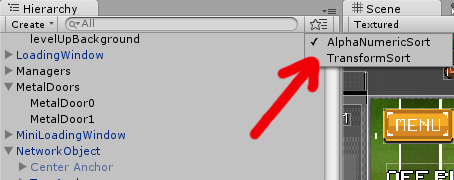
There’s actually a way to re-enable the alphanumerical sorting again. Simply download this little script (Unity3D-AlphaNumericSort) and place it in the Assets>Editor folder and you’re done! An option will appear in the hierarchy window where you can switch between sorting it by transform order or by name.
Source: http://forum.unity3d.com/threads/unity-4-5-new-hierarchy-window-sorting.248298/