A few months ago I was trying to create an Android build for one of my Unity3D projects which used to be primarily for iOS. When trying to create a build, Unity showed this error:
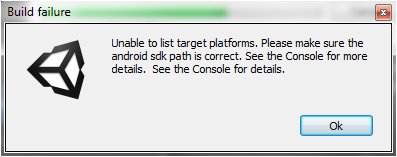
Error building Player: CommandInvokationFailure: Unable to list target platforms. Please make sure the android sdk path is correct.
The error log also displayed a bunch of Android Java files it was trying to access. To fix this, double to check if the Android SDK path is entered properly in your Unity by checking Edit > Preferences > External Tools-tab > Android SDK. If that looks ok, go through the follow instructions:
- Go to https://developer.android.com/studio/index.html
- Scroll down to the bottom of that page and find Windows “tools_r25.2.3-windows.zip“. Download and unzip it.
- Remove and replace your folder “SDK” + “/tools”.
- Use the Android “SDK Manager” and upgrade to 25.2.5.
- Now everything works again in Eclipse, Android Studio, Unity3D!
Source: https://forum.unity3d.com/threads/unable-to-convert-classes-to-dex-format-android-issue.197061/
Related Posts

Must Read UI / UX Related News 2014
Must Read UI / UX Related News 2014 - A collection of interesting UI and UX design news, updates, trends, etc.

Useful WordPress Plugins
Useful Wordpress Plugins. My list of plugins that I'm currently using for my blog and that I would recommend to other Wordpress users.

[HOW] Find Old Firebase SDK Versions for Unity3D
The SDK link on the Getting Started with Firebase page automatically downloads the latest Firebase SDK. Quite annoying if you're looking for an older version if you want to re-import an older SDK for your project for example...
[How-to-Fix] Catalyst Control Center & Native Resolution
Native resolution of wide screen not showing up after updating drivers.