
Useful Unity3D Stuff
I work quite extensively with Unity3D and over these past few years I've come across a ton of problems. Usually I managed to find a solution for them, but I don't always keep a record of those solutions. If I do, it ends up being a bookmark or a note somewhere. So I decided to make a post to keep track of useful stuff for Unity3D. I can finally clean up my mess! And who knows. It might help other people as well.
Unity3D Useful Tools, Scripts, Shaders
- Invert/Reverse Mask Shader
- Create Bitmap Fonts for Unity3D
- Open Source Unity3D UI Extensions. A bunch of scripts with more advanced and super useful UI features and effects for your Unity projects, such as Accordion, Scroll Snap, Re-orderable Lists, Curved Text, etc. Best of all... it's FREE!
- Copy to Clipboard Script for iOS & Android
Unity3D Fixes and Workarounds for Bugs and Other Wacky Things
- Allow Animator Triggering Same State
- Unity3D 4.5 Hierarchy Sorting By Name
- Black Screen on iOS Devices
- Animation Must be marked as Legacy Warning
- Canvas Component - Override Sorting disables Blocks Raycasts
- Rigidbody 2D has velocity but isn't moving after Unity 5 upgrade
- iTween.MoveTo is tweening the button to the wrong position in the Rect Transform position
- More advanced ScrollRect usage to add and expand items
- Android Keyboard White Text on White Background
- Android - Unable to List Target Platforms
Unity3D Features & C# Explanations
Articles and links that explain how certain features and coding principles actually work.
- SendMessage and BroadcastMessage
- Why float comparison doesn't work
- Designing UI for Multiple Resolutions

[FIX] Unity3D - Animation Must be marked as Legacy Warning

I ran into this warning the other day when I tried adding an animation clip to an object "Animation Component must be marked as legacy", and there was no obvious way to find and fix the legacy problem... After searching a little bit on the internet, I found this solution to fix the warning:
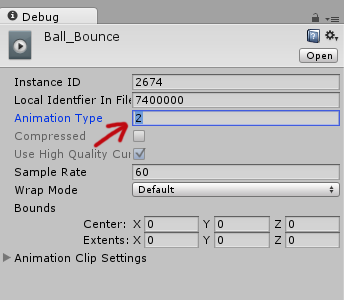
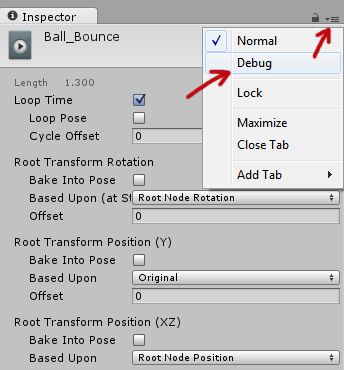
Select the animation clip in your Project > Go to the Inspector tab and clip on the "hamburger" button > Then select "Debug".
The inspector options will change into debugging mode and there set the "Animation Type" from 2 to 1. Set the inspector mode back to "Normal" through the hamburger button and it's fixed! No more legacy warnings!

[Fix] Joomla: Parameter 1 to modMainMenuHelper

Warning: Parameter 1 to modMainMenuHelper::buildXML() expected to be a reference
At present Joomla! is not certified to work with PHP 5.3.0. If you see this error message on your Joomla website, probably your web host is running PHP 5.3 or recently upgraded to PHP 5.3 (which was my case).
To fix this, go in the helper.php file (/modules/mod_mainmenu/helper.php) and change
function buildXML(&$params)
to
function buildXML($params)
Now the error should be gone!