Annoying Razer Synapse Updates
Ever since I installed Razer Synapse (Cloud-Based Mouse Driver) for my DeathAdder mouse I get very annoyed by the software updates. First of all, 99% of the time the update will require you to reboot your system which no ones likes. Especially when you just booted up your computer. Second, the windows where you confirm the update installation is pretty stupid as well.
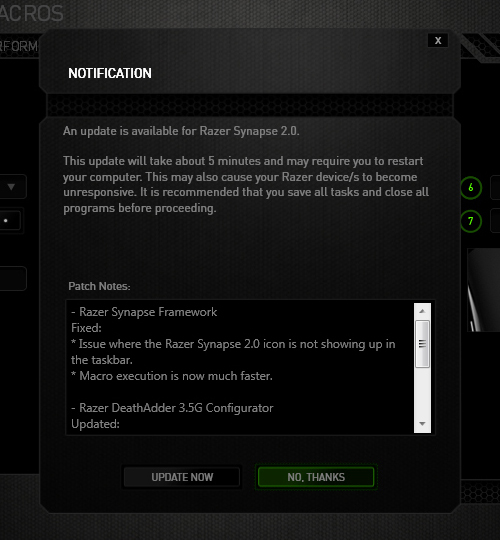
The image below is the default state in which the notification was presented. The "Update Now"(OK) option comes before the "No Thanks"(Cancel) option. Now there's always the debate whether the button arrangement should be "OK-Cancel" or "Cancel-OK". Both button orders are legitimate as the Nielsen Norman Group article points out, but what confused me was the button highlight. While updating the driver would be considered a "dangerous" action. I was immediately drawn to pressing the highlighted button, because in most UI cases they will highlight the option that they want you to press. So combined with the "I-just-want-to-get-this-over-with" mentality, I pressed the highlighted "No Thanks" option thinking it was updating when the window minimized to the system tray. Little did I know the update notification popped up again the next day when I turned on the computer... confused and enraged why Razer Synapse asked me to update again, I then discovered I was pressing the wrong button when I saw the update window for the second time. Am I raging about nothing? Or maybe I should just learn to read next time :(

Chrome's New Tab Button UI
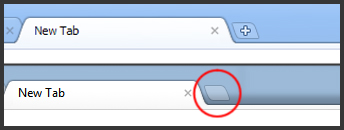
Have you noticed the small change in the Chrome UI? The "+" is gone in the "New Tab"-button! It's been bugging the shit out of me since I saw it a few days ago. Something doesn't feel right without the "+" :(
Flash AS3 TextField buttonMode
 It got so frustrated when the mouse cursor didn't change into a hand-icon when I do a MOUSE_OVER event over the MovieClip containing that TextField with "buttonMode = true;"
Apparently, the TextField class in AS3 doesn't contain the buttonMode property. The cursor does change into a hand whenever I scroll over the MovieClip, but turns back to the default cursor if I'm moving over the TextField :@
Luckily Google saved me some headaches!
To get round this simply use the "mouseChildren = false" property on your Sprite/Movieclip button.
mc.buttonMode = true;
mc.mouseChildren = false;
Source: http://www.adenforshaw.co.uk/?p=168
Re-enable Clickable Links In MSN Messenger 2009
Ever noticed that the hyperlinks posted in your msn chatbox stopped working? Apparently they turned off active links on MSN 2009 to stop a worm from spreading. I got sick and tired of copy/pasting every single one of the links in your browser, so I went to do some super detective work and found the solution.
1. Download Freeware Hex Editor XVI32: http://www.handshake.de/user/chmaas/delphi/download/xvi32.zip
2. Close Windows Live Messenger (don't forget to check the task manager)
3. Use XVI32 to open msnmgr.exe which is probably in C:\Program Files\Windows Lives\Messenger
4. Press Ctrl + F, choose Text string
5. Type in hotlinks in the search box and press OK
6. When it finds hotlinks, click on the h and change it to a t, it should now read totlinks
7. Press Ctrl + S to save
source:
http://www.forumvancouver.com/threads/clickable-links-not-working-on-windows-live-messenger-2009.577/
http://www.generationmediagroup.com/blog/re-enable-links-in-messenger-09/
