[FIX] Unity3D Black Screen on iOS Devices
We were trying to run a build of Puzzle Football on iPad yesterday to see how the game would look from an iPhone5 aspect ratio (16:9) to an iPad aspect ratio (4:3). But when we tried to run it the screen goes black. The game launches and the buttons were working so the game wasn't stuck. The weird thing was that it runs fine on the iPad2, but it shows a black screen on the iPad Mini.
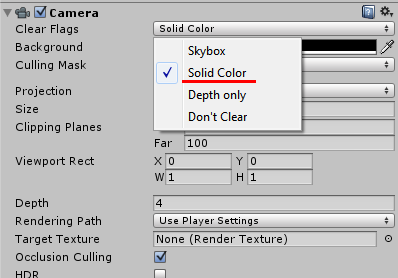
I found a fix on the Unity forum which mentions changing the Clear Flags property on the Camera object by setting it to "Solid Color" (it was on "Don't Clear" before). Not sure why it needs to be on Solid Color, but it's working now! No more black screen on the iPad Mini!

[FIX] Unity3D - Animation Must be marked as Legacy Warning

I ran into this warning the other day when I tried adding an animation clip to an object "Animation Component must be marked as legacy", and there was no obvious way to find and fix the legacy problem... After searching a little bit on the internet, I found this solution to fix the warning:
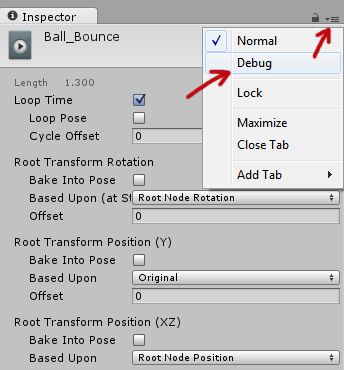
Select the animation clip in your Project > Go to the Inspector tab and clip on the "hamburger" button > Then select "Debug".
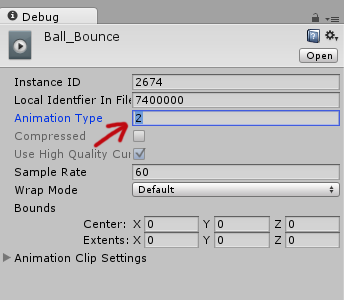
The inspector options will change into debugging mode and there set the "Animation Type" from 2 to 1. Set the inspector mode back to "Normal" through the hamburger button and it's fixed! No more legacy warnings!
[FIX] Bioshock: Infinite - Audio Crackling
I had this weird issue with the game when the audio suddenly starts crackling / lagging, especially when I'm playing Voxophones. It's super annoying and kind of an experience-killer. Anyway, after long searches on the internet, I found this solution:
Set compatibility mode to Windows Vista SP2.
1. Navigate to C:\Program Files (x86)\Steam\steamapps\common\BioShock Infinite\Binaries\Win32
2. Right-click on the BioShockInfinite.exe and select Properties.
3. Go to Compatibility tab and select Windows Vista SP2.
Also, don't forget to upgrade your graphics card to the newest driver.
[HOW] HTML/CSS: Prevent Scrollbar Jump
Firefox and Chrome doesn't show a scrollbar on the right if the content of a page isn't longer than the window. But when the content becomes longer, the vertical scrollbar appears and causes the layout to shift. This "jump" can be quite annoying as the whole layout moves to the left. To fix this:
html {
  overflow-y:scroll;
}
[How-to-Fix] Bold / Italic not showing in Epubs
Making Epubs is a pain in the ass. You can't just convert a PDF into an Epub that can be used effectively for e-readers as it requires style formatting and further editing. One thing that was super annoying was that Bold & Italic text wasn't showing properly. The Epub worked fine in Adobe Digital Editions, but the font style didn't show up correctly in Calibre.
One way to fix this is to manually dig into the Epub and change the CSS (rename the file's extension from .epub to .zip or .rar -> open it -> find "template.css" -> edit the CSS in an editor such as Dreamweaver -> save -> rename file extention back to .epub). This option is very tedious and sensitive to errors, but it does the job.
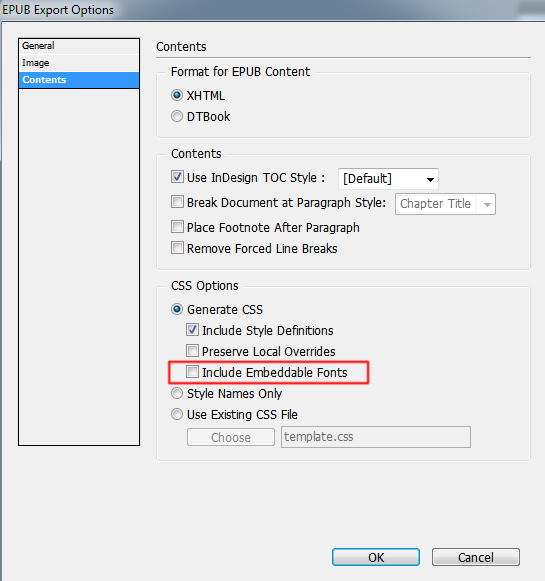
Later I found out it could have been fixed way easier... Upon exporting your Epub in InDesign, go to the Contents tab and Uncheck "Include Embeddable Fonts". This is very counter intuitive as you might think you would want to embed any fonts for it to be able to display your fonts properly.
Anyway, easy fix... took me hours to figure out... hopefully I can save someone some headaches :)
[How] Premiere: Avi File; No Video, Only Audio

Herpderp! I had some trouble importing AVI files to Adobe Premiere. It would only import the audio file and not the video. Same thing in Windows Media Player; no video, only audio, but it worked fine when I opened the file in VLC. Frustrated, tried to convert it to other formats, changing file extensions, installed additional codecs... nothing worked!! After 30 minutes of screwing around I figured it out.
The video was recorded using Fraps at my school, but I was editing the video at home and I didn't have Fraps installed. Apparently, videos recorded by Fraps sometimes require the FPS1 codec from Fraps. So Installing Fraps would also install the FPS1 codec. After that the video worked in Windows Media Player and worked in Premiere!! Yaaaaay!!
[How-to-Fix] Shorten Google+ URL
Google+ doesn't have the option (yet), like Facebook, to shorten and customize the URL of your profile.
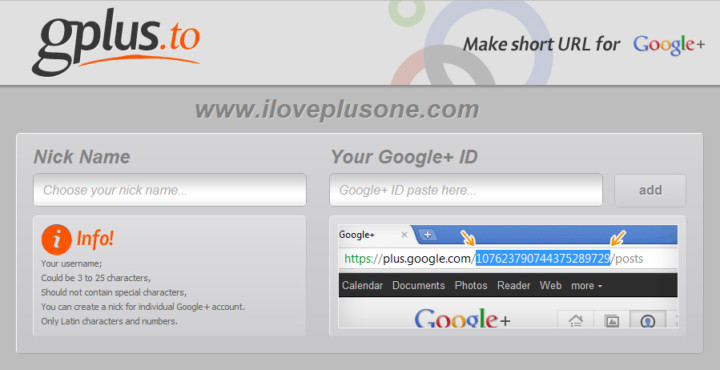
A way to create one is through a third party site Gplus.to. Simply add your desired name and your Google+ ID and voila! Don't forget to add me http://gplus.to/ElwinLee :D
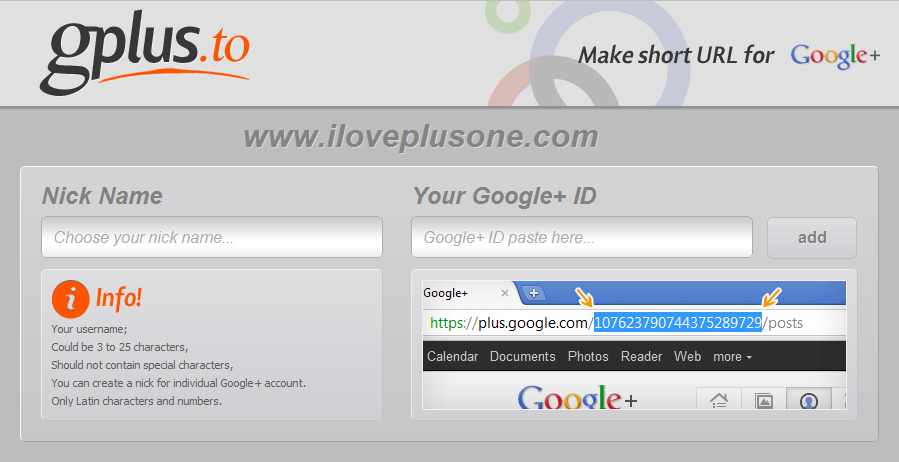
Source: http://itpromate.com/2011/07/how-to-shorten-your-google-profile-url/

[How-to-Fix] Catalyst Control Center & Native Resolution

My 23" Dell SP2309W has a native resolution of 2048x1152 and worked fine until yesterday when I tried to update the driver of my ATI Radeon HD 5700 graphic card. After updating, the highest resolution I could select was 1920x1080 and I was unable to set the resolution back to the native 2048x1152 resolution. This was driving me crazy, because everything was all blurry in 1920x1080 :(
The problem seems to occur when you have multiple screens connected to your PC; in my case I have my Dell monitor and my Samsung TV connected to my desktop. Before, my Dell was my primary and my Samsung was my secondary screen, but after the update my Samsung became the primary and my Dell the secondary. Apparently, after updating the drivers, ATI's Catalyst Control Center sometimes selects a different screen as your primary which results that my PC wasn't showing up the native resolution of my 23" monitor. To make it worse, your screen is duplicated across both screens, so it's not apparent that the index of your screens are changed or what so ever.
Anyway, to fix this, just disable your 2nd screen or make your monitor; with the higher native resolution, your primary! Easy as that, but it's not very obvious :)