[FIX] Unity3D - Animation Must be marked as Legacy Warning

I ran into this warning the other day when I tried adding an animation clip to an object "Animation Component must be marked as legacy", and there was no obvious way to find and fix the legacy problem... After searching a little bit on the internet, I found this solution to fix the warning:
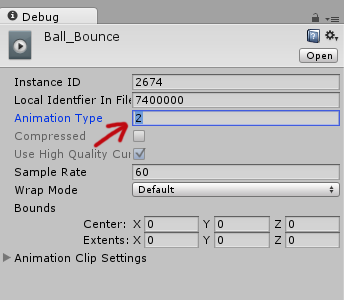
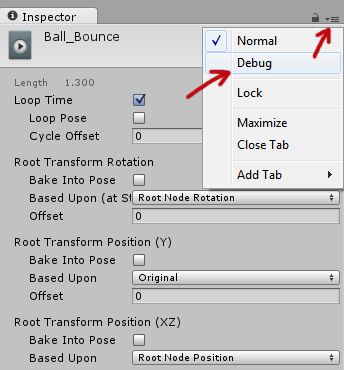
Select the animation clip in your Project > Go to the Inspector tab and clip on the "hamburger" button > Then select "Debug".
The inspector options will change into debugging mode and there set the "Animation Type" from 2 to 1. Set the inspector mode back to "Normal" through the hamburger button and it's fixed! No more legacy warnings!

[How] Flash: Seek() & PlayHeadTime() Accuracy

Using seek() and PlayHeadTime() with FLVPlayback component of video files in Flash can be quite inaccurate. We had the same problem when we were building a prototype for our project, which involved switching and syncing of videos using specific timing. PlayHeadTime gave a decimal value, but whenever we would do a seek() using the PlayHeadTime value on a video, the timing would be off by 0.5-1 second.
Apparently, the accuracy of the seek() function is dependent on the keyFrameInterval of the video and the FPS meaning Precision = keyFrameInterval / FPS.
So for example, if you have a keyFrameInterval = 30 (1st frame will be a keyframe, 30th frame will be a keyframe, 60th frame ... etc.) and FPS is set on 15, you'll only be able to seek in 2-seconds intervals of time (precision = 30 / 15).
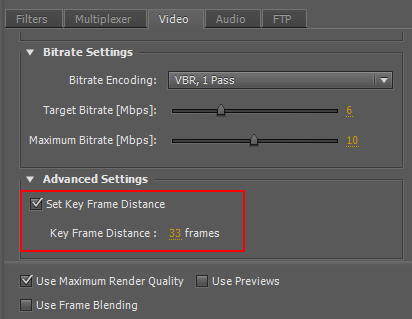
To make the seeking more accurate, set the key frame distance when exporting your video with Adobe Premiere. This option can be found in the "video" tab, "Advanced Settings", check "Set Key Frame Distance" and set the key frame distance lower. Export it and now your seek() accuracy would be more precise!
