
[HOW] HTML/CSS: Prevent Scrollbar Jump
Firefox and Chrome doesn't show a scrollbar on the right if the content of a page isn't longer than the window. But when the content becomes longer, the vertical scrollbar appears and causes the layout to shift. This "jump" can be quite annoying as the whole layout moves to the left. To fix this:
html {
  overflow-y:scroll;
}

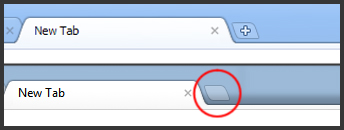
Chrome's New Tab Button UI
Have you noticed the small change in the Chrome UI? The "+" is gone in the "New Tab"-button! It's been bugging the shit out of me since I saw it a few days ago. Something doesn't feel right without the "+" :(
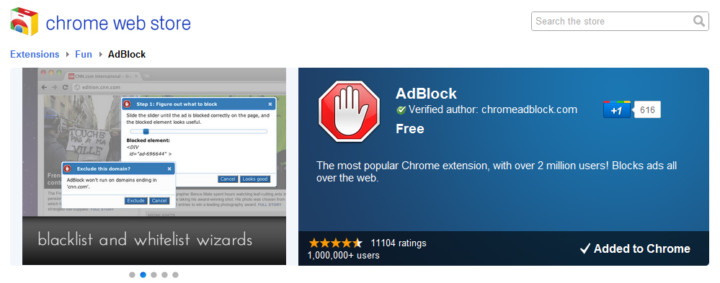
[How-to-Fix] Chrome Adblock & Youtube Auto HD
Great extensions if you're using Google Chrome! :)
AdBlock

AdBlock for Chrome! Block all advertisements on all web pages, even Facebook and Youtube. Your browser is automatically updated with additions to the filter: just click Install, then visit your favorite website and see the ads disappear!
Auto HD for YouTube

Auto HD! With this extension all youtube video start playing in HD. In addition you can specify if you want the player widened.
Google Chrome - Recovering Deleted Bookmarks

Yesterday I accidentally deleted one of my bookmarks on Google Chrome. It doesn't prompt a warning or moves it to the Trash Bin, it just deletes it... and there's no recover option.
Luckily, there's a way to get your deleted bookmarks back by using the bookmark backup file that Chrome creates, allowing you to "recover" it. Simply replace the Bookmarks-file with the backup and it's back in place :D
For Xp user's, Go to : C:\Documents and Settings\Administrator\Local Settings\Application Data\Google\Chrome\User Data\Default
For Vista user's, Go to : C:\Users\Administrator\Local Settings\Application Data\Google\Chrome\User Data\Default
For Windows 7 user's, Go to : C:\Users\Administrator\AppData\Local\Google\Chrome\User Data\Default

You can see a file named 'Bookmarks.bak' . You can make an extra backup of it if you prefer, but it should work just fine. Delete the file 'Bookmark' and rename the file 'Bookmarks.bak' to 'Bookmarks' and BAM!! problem solved :D
Source: http://tech-knowlogy.blogspot.com/2009/07/recover-deleted-bookmarks-in-google.html