We were trying to run a build of Puzzle Football on iPad yesterday to see how the game would look from an iPhone5 aspect ratio (16:9) to an iPad aspect ratio (4:3). But when we tried to run it the screen goes black. The game launches and the buttons were working so the game wasn’t stuck. The weird thing was that it runs fine on the iPad2, but it shows a black screen on the iPad Mini.
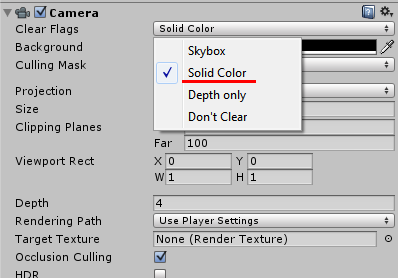
I found a fix on the Unity forum which mentions changing the Clear Flags property on the Camera object by setting it to “Solid Color” (it was on “Don’t Clear” before). Not sure why it needs to be on Solid Color, but it’s working now! No more black screen on the iPad Mini!
Related Posts

Akaroa Panorama 02
A panorama picture taken on my way to Akaroa in New Zealand

Pittsburgh from Mount Washington Panorama
Pittsburgh from Mount Washington panorama picture
Puzzle Football Indiegogo Campaign!
The game that I've been working over the last couple of months as an interface designer and pixel artist just launched its Indiegogo funding campaign!