
[How-to-Fix] Joomla!: Enabling Object, Embed & Iframe
Joomla blacklists <object>, <embed> & <iframe> by default for security reasons and filters out and removes these tags from your articles if you try to add them in your content. The iframe and embed options are useful to integrate e.g. Google Maps and Youtube. There's a solution to disable the filtering by de-selecting certain user groups in joomla as blacklisted for filtering. This didn't work for me though.
Instead, here's a method to get it to work by diving into the PHP file itself. To disable the filtering, edit the filter PHP file and remove the tags from the blacklist.
Path: libraries\joomla\filter\filterinput.php
$tagBlacklist = array ('applet', 'body', 'bgsound', 'base', 'basefont', 'embed', 'frame', 'frameset', 'head', 'html', 'id', 'iframe', 'ilayer', 'layer', 'link', 'meta', 'name', 'object', 'script', 'style', 'title', 'xml');





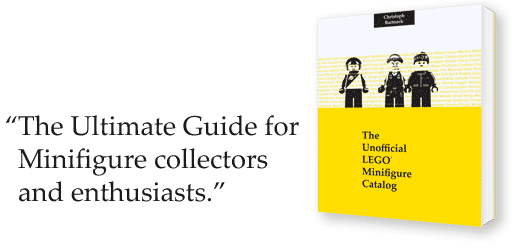
LEGO Minifigure Catalog Released!
The book went through several checks and has finally been approved and is now available for purchase at CreateSpace and later this month on Amazon.com! You can also download the catalog as an eBook from Lulu.

This catalog presents high quality photographs of all LEGO® Minifigures released between 1970s and 2010. The 3600 plus Minifigures® are organized by an innovative nomenclature that makes it easy to identify Minifigures®. Several indexes make it even easier to find Minifigures®, the sets in which they appeared and what heads belong to which Minifigure®. This catalog is the essential guide for all Minifigure® collectors and enthusiasts.
Visit the website for more information.



[How] Google Maps Short URLs
The experimental short GoogleMaps URLs stopped working since the beta launch of Google+. This was very upsetting, because we were sent back to the stone-age with super duper long URLs. For example this is the full link to GoogleMaps with a view on my old university in Eindhoven The Netherlands https://www.google.com/maps/preview#!q=Technische+Universiteit+Eindhoven%2C+Centrum%2C+Eindhoven%2C+Nederland&data=!1m4!1m3!1d5018!2d5.4893414!3d51.4487944!4m11!1m10!4m8!1m3!1d1563190!2d-74.724323!3d40.07304!3m2!1i1024!2i768!4f13.1!17b1.
It would get even longer if you have more search terms and filtering enabled.
Anyway, back to the main reason why you people are reading this.
Go to http://goo.gl/ and simply paste your GoogleMaps URL and voila!!
Our new link would be http://goo.gl/JmgYe
There you have it! Short links again :)
It requires a bit more work than the Labs experiment (clicking on the link button vs. going to http://goo.gl/ and enter the url). http://goo.gl/ works with every link you want to shorten and it saves all the short urls that you've made before if you have a Google Account!! Here's the short(er) link to my blog http://goo.gl/UxBIh
HTML: Fixed Column Width Regardless of Content
I was doing some scripting in PHP to create tables with data drawn from a database. Drawing multiple fields using the same script caused the table layout to shift. This can be fixed using the tag within the table. I thought it was kind of interesting, so I thought sharing it using an example.
An example of a 3 column table setup would be something like this:
<table width="400" border="1">
   <?php $table_count = 0; ?>
      <?php if(count($this->items) > 0):   //if there's content
         foreach($this->items as $content):   //loop through all content
            if( $table_count == 0 ): ?>
               <tr>
      <?php endif; ?>
         <td width="33%">   //to create 3 columns
            //insert content here
         </td>
            <?php if( $table_count == 2 ): ?>   //3 columns, so table_count = 3 - 1 = 2
               </tr>
            <?php $table_count = 0; ?>   //column length reached, reset count
               <?php else: ?>
                  <?php $table_count++; ?>
            <?php endif; ?>
</table>
I was using the same script to parse multiple database fields onto 1 page. E.g. an employees page of a company. The page would display all the employees categorized in different positions within the company, so the number of people per position varies.
The script shown above would be used for all the categories to create a 3 column table.
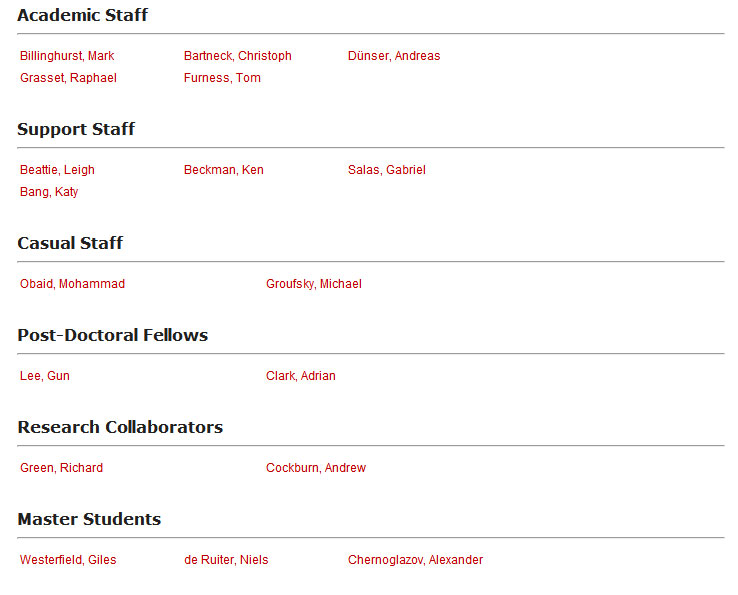
Creating the table works fine, if we parse content of 3 or more items from the database to PHP. But a problem occurs with the layout if there are less items than the number of columns within a category.
Example with enough items:
| Item 1 | Item 2 | Item 3 |
Example if the database field has only 2 items (using the same script)
| Item 1 | Item 2 |
Or look at the visual example
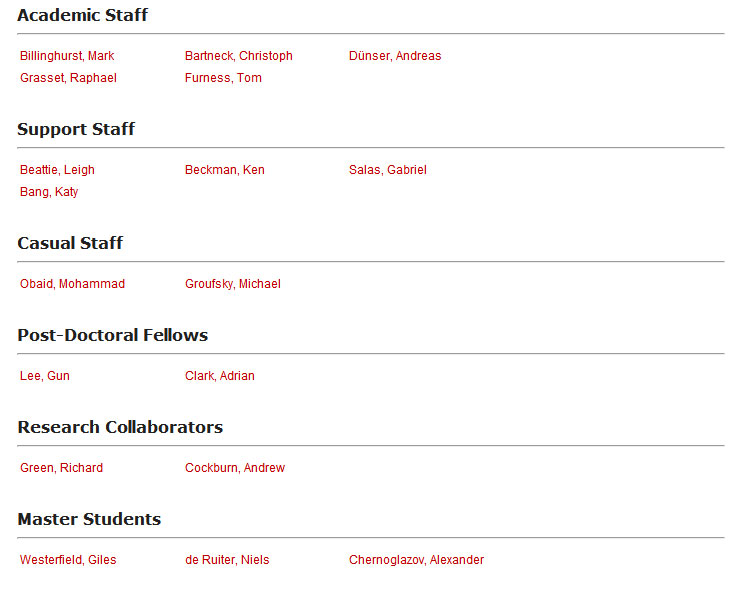
To fix this, simply add a table-layout CSS style and <col>
><table width="70%" style="table-layout:fixed">
                     <col width="33%">
                     <col width="33%">
                     <col width="33%">
Have fun :)

Unable to open Word Files (Error)
I was going through some old documents when suddenly every single Word file threw in an error causing Word not even to launch and even using the Word Safe Mode launcher didn't help.
I got scared when not 1... not 2... but almost all my Word files started being listed as corrupted!! All my work! OH NO!!! :@
The internet suggested using the Font Restore option under "Control Panel > Appearance & Personalization > Fonts > Font Settings > Restore default font settings", but that didn't fix the problem.... I tried system restore.... NOTHING!! Until I realized that I installed some fonts about a week back.
I opened the Fonts folder and looked up the fonts that I recently installed and I noticed that the icons of those fonts had "$#@" on them instead of "ABC". I tried deleting them, but again error! Saying that the font is currently in use!! Closed all application, but still no luck...
Finally, I booted Windows in Safe Mode and it allowed me to delete those corrupted fonts. Restarted it and BAM! Everything worked again (after 2 hours or rage)! :D *phew*
In short: If you're unable to open your Word files and Word starts throwing in errors, check if you installed any fonts recently. Look them up and see if they are corrupted and delete them if they are. If you're unable to delete them, go in Safe Mode and delete it :)